
In September we set out our plan for rolling out Opterra and promised to keep you posted. Four weeks on, the team has shipped more than 80 improvements and fixes across the web and mobile apps.
Most of that work lands in the three areas we highlighted last month: Paddock Planning, Insights, and recording in the paddock. Here’s what’s new, and what’s coming before the end of October.
Web app
Insights you can act on
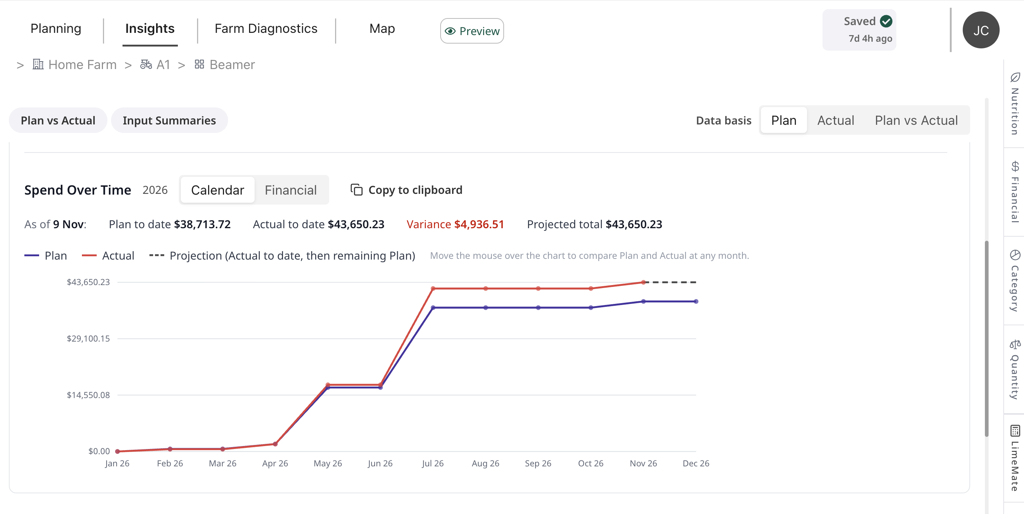
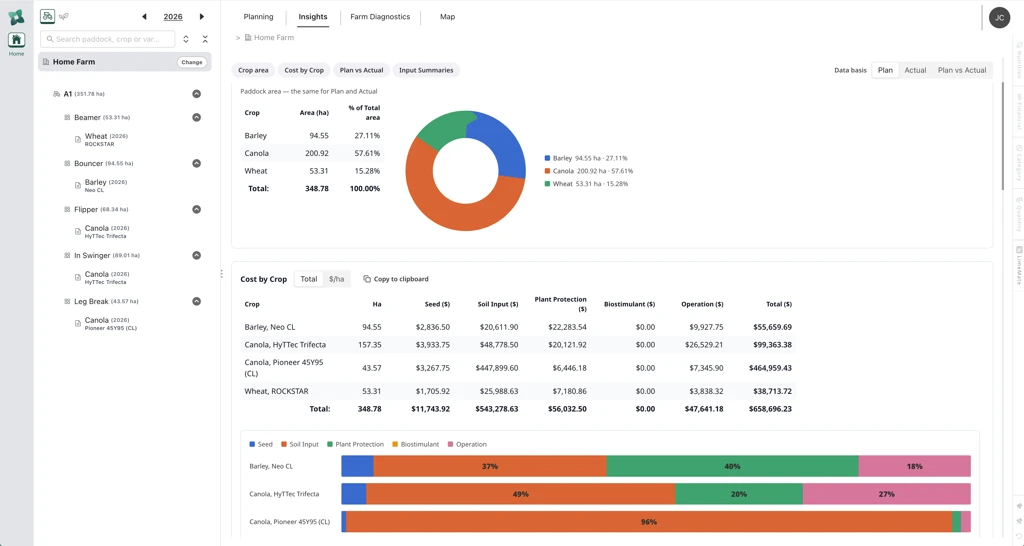
Insights has been rebuilt around new dashboards, with Live totals, Insights and Farm diagnostics now linked so you can move from a headline number to the detail behind it in a click.
- Margin & break-even: the Gross margin view now includes break-even analysis, so you can see what yield or price a paddock needs to cover its costs.
- Spend over time: grouped by year, with a projection line showing where the season is heading.
- Plan vs actual: Cost by Crop and Plan vs Actual Spend each have their own clear view, and input summaries now come with charts.
- Numbers you can trust: we’ve tightened several calculations, including nutrition per hectare and yearly totals, and made it clear which data source each year draws on.
Paddock Planning
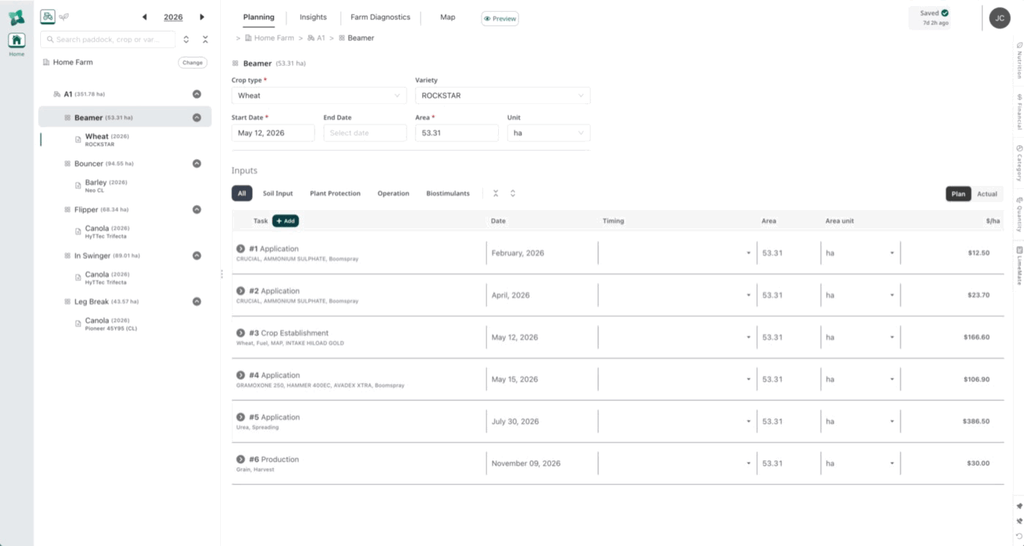
Building a plan is faster and more complete.
- Crop establishment tasks, with a step-by-step crop type to variety picker drawing on the full crop and variety catalogue.
- Seed treatment fields, plus task notes, target and water rate on every application.
- Drag-and-drop (or keyboard) re-ordering of input steps, and quicker selection of multiple inputs.
Farm Plan Preview
Preview and print a whole-farm plan across every paddock for the plan year, ready to share with the client or the operator.
LimeMate, now in Opterra
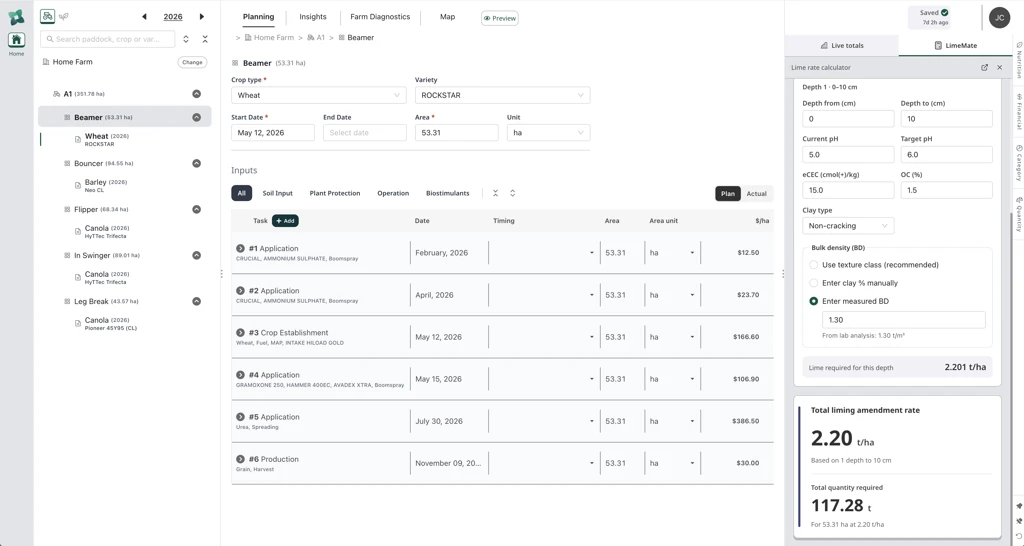
LimeMate is now integrated into the Opterra web app, so lime recommendations sit alongside the rest of the paddock plan.
Smaller things that add up
Voice input for notes, paddock names visible at every map zoom level, more reliable back and refresh behaviour, and a cleaner paddock tree on the left-hand side.
Mobile app (Apple and Android)
Recording in fewer taps

Getting from plan to done in the paddock is quicker.
- Quick complete: mark a Paddock Plan task as Actual in one step.
- Rec to Actual: a smoother flow for converting a recommendation to an Actual, with clearer buttons along the way.
- Fewer taps for application details: weather, nozzles and target are faster to fill in.
We’ve also refreshed the Activity list, made a range of small improvements for use in the field, and continued strengthening sync so your records stay accurate between web and mobile.
Coming before the end of October
In September we said a few key Paddock Planning features were still in development. These will be available before the end of this month.
- Production tasks on the web, completing the set of task types in a paddock plan.
- Fixed costs that can be added to a paddock outside of an application, for a fuller gross margin picture.
- Nutrition lens: a nutrient audit and program-setting view across multiple paddocks.
- Insights in Farm Plan Preview: include Insights and Farm diagnostics in the printed plan.
- Phone and tablet improvements: select several inputs at once, more compact area selection and load plan lists on phones, and a better pick list and number keypad on tablets.
Ready to try it with a client?
The approach hasn’t changed: start with one or a few engaged clients, trial the web and mobile apps with a copy of their history, and build confidence before season ’27 gets busy. Our import tool brings a client’s file history across from Back Paddock Adviser Manager and Mobile (read how it works).
If you have a client in mind, or would like a demo first, get in touch at info@backpaddock.com.au and we’ll set it up.
All the best,
Jack Cowlrick